HRIS integration (Workers)
The HRIS integration synchronises your worker directory into Deeper Signals on a 30-minute cadence, builds the manager hierarchy used for access control, and writes assessment results back to the worker record. Complete Part 1 first; if you also intend to enable Part 2 (ATS), the worker-side write-back of assessment results is performed automatically when a candidate is hired.
3.1 Custom Object on Worker
Create a second custom object — this time on the Worker business object — to hold per-dimension scores for hires and existing employees. Run Create Custom Object again and apply the same shape as for the candidate object:
| Field | Value |
|---|---|
| Workday Object | Worker |
| Custom Object Name | Worker Assessment Dimension Result |
| Allow Multiple Instances per Object? | Checked. |
| Security Domains | Custom Domain 1; Worker Data: Public Worker Reports |
| Display Value | Dimension Category |
Add the same three fields with identical Web Service Aliases:
| Field Label | Type | Web Service Alias |
|---|---|---|
| Dimension Name | Text | dimensionName |
| Score | Integer | score |
| Dimension Category | Text | dimensionCategory |
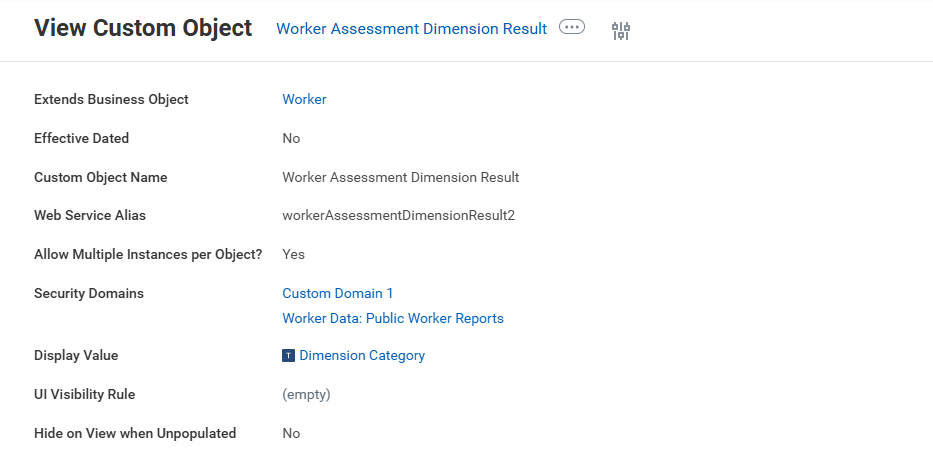
The completed worker custom object, extending the Worker business object.
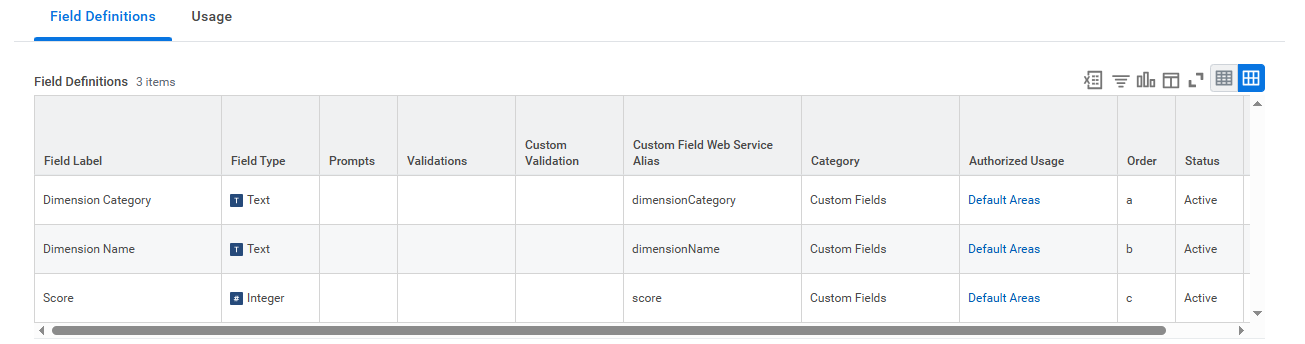
The three field aliases on the worker custom object — must match the candidate side.
For consistency we recommend setting the custom object's Web Service Alias to workerDeeperSignalAssessmentDimensionResult. Note the worker custom object alias + the three field aliases — you will enter them into the Deeper Signals admin UI in Part 5.2.3.
:::info Field names are flexible
As with the candidate-side custom object (Part 2.3), workerDeeperSignalAssessmentDimensionResult, dimensionName, score, and dimensionCategory are recommendations only. You can choose any Web Service Aliases that fit your tenant's naming conventions — the integration reads whichever aliases you enter on the Deeper Signals integration configuration page. We do recommend keeping the field aliases identical between the candidate and worker custom objects so the same Deeper Signals report definitions can write to both surfaces unchanged.
:::
3.2 Profile Groups (worker visibility)
:::warning Don't skip this step
Deeper Signals can write to the worker custom object successfully and the data will not appear anywhere on the worker profile until the custom object is added to the relevant Profile Group(s). This is the most commonly missed configuration — the data is in Workday but invisible to managers. :::
In Workday, configure your worker Profile Group(s) so that the new custom object is included in the profile views that managers and HR users will use. Specifically, ensure the worker custom object is referenced in the relevant Profile Group's tab/section configuration.
3.3 Document Categories
The integration uploads PDF assessment reports to two places: candidate attachments (when assessing a candidate) and worker documents (when the candidate is hired or for an already-existing employee). The two sides behave differently and should be configured independently.
| Surface | SOAP operation | Document Category Reference Type | Behaviour |
|---|---|---|---|
| Candidate (Job Application) | Put_Candidate_Attachment | Document_Category__Workday_Owned__ID | Built-in default OTHER_DOCUMENTS — Workday-owned, exists in every tenant; can be overridden. |
| Worker | Put_Worker_Document | Document_Category_ID | No built-in default. Read at runtime from the per-tenant worker_document_category setting on the Deeper Signals integration configuration page. Recommended value: ASSESSMENT. |
:::warning Worker document upload requires a category
If worker_document_category is left blank on the Deeper Signals integration configuration page, worker PDF reports will not be uploaded to Workday. The per-dimension custom-object write-back (REST) still runs; only the SOAP Put_Worker_Document attachment is skipped. Set this value before going live with the HRIS integration.
:::
ASSESSMENT is a Workday-owned Document Category that exists in every tenant, so the recommended setup is to enter ASSESSMENT as the value on the Deeper Signals side and the documents will land under the standard Assessment bucket on the worker profile. If you want to route reports into a different category — for example a custom "manager-only" bucket for Core Drivers Pro — create the Document Category in Workday and enter that Reference ID instead.
The candidate side has a built-in fallback: if no override is configured, the integration uses OTHER_DOCUMENTS automatically. To override it, create a custom Document Category in Workday and enter that Reference ID on the corresponding ATS configuration page in the Deeper Signals admin app (Part 5.3).
3.4 Worker data quality requirements
Deeper Signals treats Workday as the source of truth for the worker directory and the manager hierarchy. The integration synchronises and rebuilds the org tree on every run; it does not patch your data. Two data-quality rules need to hold:
3.4.1 Every worker should have a Work Email
Deeper Signals matches workers to platform users by email. Workers without a Work Email are imported under a synthetic placeholder address so the manager chain stays intact, but those users won't be able to sign in or be invited to assessments until an email is added in Workday. We recommend filling in Work Email (or a Workday username) for every worker before the first sync.
3.4.2 Manager references must form a tree, not a cycle
Each worker's Manager_as_of_last_detected_manager_change_Reference must point at another worker (or be empty for the top of the tree). A worker that points at themselves — typically a data-entry error — is detected, logged, and skipped during the hierarchy rebuild, but the worker won't appear under any higher-level manager until the cycle is fixed.
3.5 What happens at runtime
- Every 30 minutes, Deeper Signals runs an incremental HRIS sync:
Get_Workersfiltered by Transaction_Date_Range covering the window since the last successful sync. - For each worker returned, Deeper Signals applies your configured field mapping (default fields include email, employee_id, full_name, business_title, management_level, location, department, business_unit, company, cost_center, hire_date, termination_date), upserts the user in Deeper Signals, and stores their HRIS data row.
- The manager reference on each worker is used to rebuild the manager → subordinate tree (a closure table in Deeper Signals). This tree drives manager visibility on the platform: a manager sees themselves and everyone reporting up to them, but not peers or higher-level employees.
- When a Deeper Signals assessment is completed by a worker (either a hired-from-candidate or an employee invited directly through Deeper Signals), the integration writes per-dimension scores to the worker custom object via REST. If
worker_document_categoryis configured on the Deeper Signals side (recommended value:ASSESSMENT), the integration also callsPut_Worker_Documentto attach the PDF report to the worker. If left blank, the REST write still runs but the PDF upload is skipped — see Part 3.3. - A first-run or on-demand full sync is available — typically used after adding a new HRIS field to the mapping so the new field is back-filled across all existing workers. Incremental syncs only re-fetch workers that have been updated in Workday since
last_sync_at.
For a complete list of API calls, see Appendix A.
:::info Sync ordering when a candidate is hired
When a candidate is hired in Workday, the recommended way to test the end-to-end path is to let the ATS poll run first, not the HRIS sync. The ATS poll detects the newly populated Worker_ID and triggers a single-worker HRIS sync to back-fill the right user automatically. Manually triggering an HRIS sync first can create a separate "pending user" before the ATS side has a chance to claim the worker, which then has to be reconciled.
:::